GoHighLevel n8n integrations connect HighLevel’s CRM and workflows to the tools HighLevel does not cover natively, using n8n as the middle layer. Automize, led by Ryan Van Tricht, builds and repairs GoHighLevel systems, including integrations that run through n8n, Zapier, Make and the GoHighLevel API.
n8n gives you three ways to connect. It has a built-in HighLevel node, it can receive and send webhooks, and it can call any HighLevel API endpoint through its HTTP Request node. Which one fits depends on what the workflow has to do.
What is n8n, and how does it relate to GoHighLevel?
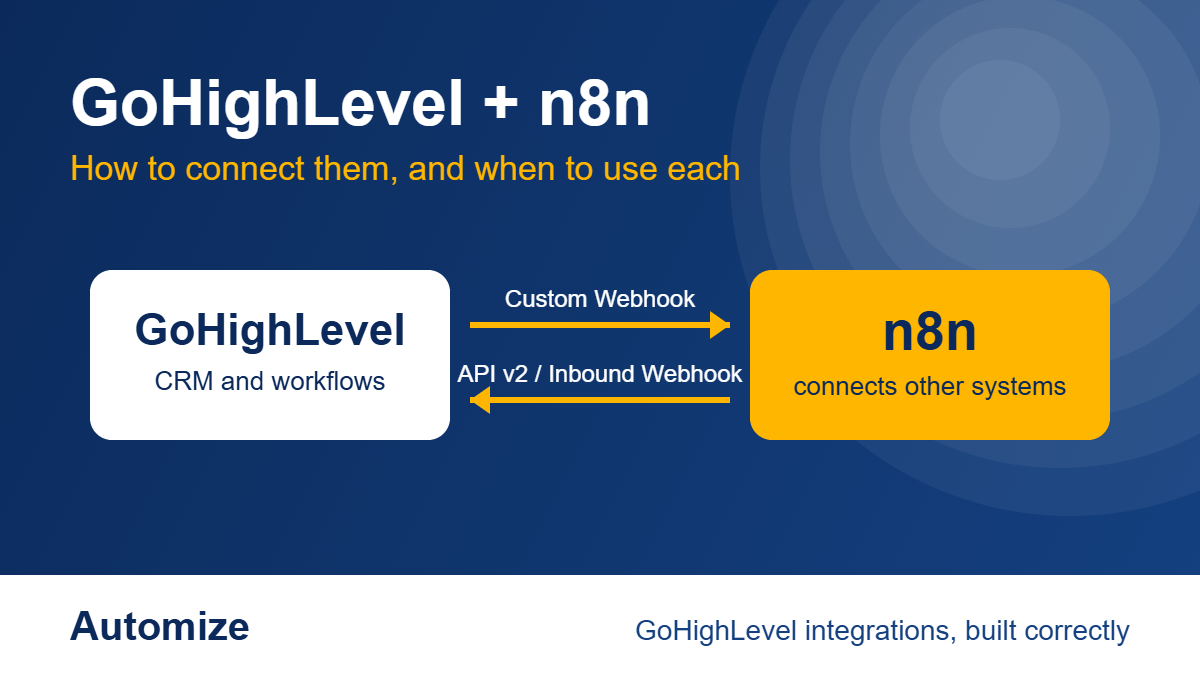
n8n is a workflow automation tool that connects apps through nodes. GoHighLevel already has its own workflow builder for CRM logic: follow-up, pipelines, appointments and messaging. n8n sits beside it and handles what happens between GoHighLevel and other systems, such as databases, spreadsheets, AI models and software HighLevel has no native connection to.
The practical rule: keep CRM logic in GoHighLevel and use n8n for work that crosses into other systems. Our guide to GoHighLevel integrations covers the native options first.
What can the n8n HighLevel node do?
According to n8n’s documentation, the HighLevel node covers four resources:
- Contact: create or update, delete, get, get many, update
- Opportunity: create, delete, get, get many, update
- Task: create, delete, get, get many, update
- Calendar: book an appointment, get free slots
For anything outside those operations, n8n’s documentation says to use the HTTP Request node with your HighLevel credential. That is the route to HighLevel API endpoints the node does not expose.
Want to know if we are a fit for your build?
Tell us how your business runs and what you need it to do, and we will tell you how we would build it.
We review every submission and follow up within 2–3 business hours. No obligation. No sales pitch.
How do you authenticate n8n with HighLevel?
n8n supports two credential types for HighLevel: an API key, which works with API v1, and OAuth2, which works with API v2. n8n’s credentials page states that HighLevel deprecated API v1.0 and no longer maintains it, so new credentials should use OAuth2.
OAuth2 setup requires a HighLevel app with sub-account distribution, a Client ID and Client Secret, and the exact scopes entered in both HighLevel and the n8n credential. A scope missing on either side is a common reason a connection authenticates but a call is refused.
If an older automation still runs on a v1 API key, treat it as a risk to schedule a fix for, not something to leave alone.
How do you send data from GoHighLevel to n8n?
Use a webhook. In n8n, add a Webhook node as the trigger and copy its URL. In a HighLevel workflow, add the Custom Webhook action and paste that URL. HighLevel’s help center describes Custom Webhook as an outbound action that sends GET, POST, PUT or DELETE requests, with configurable headers, authentication, query parameters and JSON or form payloads.
Run a test contact through the workflow and confirm the payload arrives in n8n before building anything on it. Check which contact fields the payload actually carries. A field that is empty in the test will be empty in production.
How do you send data from n8n into GoHighLevel?
Two routes. The HighLevel node can create or update a contact, an opportunity or a task directly. Or n8n can post to a HighLevel Inbound Webhook trigger, which HighLevel documents as capturing incoming requests at a URL unique to each trigger. The inbound route lets a HighLevel workflow take over from there, so the CRM logic stays inside GoHighLevel.
Check HighLevel’s current help pages for how your plan treats webhook triggers and actions, because plan terms change.
When should you use n8n instead of GoHighLevel’s own workflows?
Use GoHighLevel’s workflow builder when the whole process lives in HighLevel: capturing a lead, routing it, following up, booking, moving a pipeline stage. See our guide to GoHighLevel workflow automation. Use n8n when the process has to read from or write to something outside HighLevel, or needs logic the native builder does not offer.
Do not move CRM logic into n8n just because it can hold it. A process split across two tools is harder to debug, and the person who inherits it has two places to look.
n8n, Zapier or Make for GoHighLevel?
Zapier, Make and n8n all connect to HighLevel, and the right one is usually the one the business already runs. Ryan works in Zapier first and also in Make and n8n when a client already uses them. For the three-way comparison, see Automize’s guide to Zapier vs Make vs n8n for GoHighLevel workflows, or work with a certified Zapier expert.
What goes wrong with n8n and GoHighLevel integrations?
These are failure points that follow from the documentation above:
- A v1 API key still in use. v1 is deprecated, so a working integration can stop without warning.
- OAuth2 scopes that differ between the HighLevel app and the n8n credential.
- A webhook payload that was never tested with a realistic contact, so mapped fields arrive empty.
- Two systems writing to the same contact field, so the last write wins and nobody knows which one.
- Failures nobody sees. An n8n workflow can error while HighLevel still shows the contact moving normally. Someone has to own the error alerts.
These silent failures are the same pattern we see in GoHighLevel phone and SMS setups: the workflow shows as running while the result never arrives.
Who builds and repairs GoHighLevel n8n integrations?
Automize does. You work directly with Ryan, with no account manager between you and the person building the system. The engagement starts with a discovery call and a fixed-price proposal, the build is tested in a separate environment before it touches your live account, and handoff includes step-by-step guides and recorded walkthroughs. Larger projects usually take weeks, and the timeline and cost are set in discovery. See how a GoHighLevel build runs and how to hire a GoHighLevel expert.
Want to know if we are a fit for your build?
Tell us how your business runs and what you need it to do, and we will tell you how we would build it.
We review every submission and follow up within 2–3 business hours. No obligation. No sales pitch.
Frequently asked questions
Does GoHighLevel have a native n8n integration?
Yes. n8n has a built-in HighLevel node that covers contacts, opportunities, tasks and calendar actions, and the HTTP Request node reaches other HighLevel API endpoints. On the HighLevel side, the Custom Webhook action sends data out and the Inbound Webhook trigger receives it.
Should I use the API key or OAuth2 to connect n8n to HighLevel?
Use OAuth2. n8n’s documentation states that HighLevel deprecated API v1.0, which is what the API key works with. OAuth2 uses API v2 and needs a HighLevel app, a Client ID and Secret, and matching scopes in both tools.
Can n8n replace GoHighLevel workflows?
For most businesses, no. GoHighLevel’s workflow builder is built for CRM logic, and n8n is built for connecting systems. Keeping CRM logic in HighLevel and cross-system work in n8n leaves one place to look when something breaks.
Why did my GoHighLevel webhook stop reaching n8n?
Start with the URL in the HighLevel Custom Webhook action. n8n registers the production URL when you publish the workflow, while the test URL only listens while you are building, so a workflow that is unpublished or pointed at the test URL will not receive live requests. Then run a test contact through the HighLevel workflow and compare the payload to what n8n received.
We already paid someone to build this and it still doesn’t work. Can you fix it?
Yes, that is a common starting point. We check authentication, scopes, payloads and error handling, rebuild what is wrong and test it end to end in a separate environment. You work directly with Ryan Van Tricht, and extra work after handoff is billed separately.
Do you work in n8n, or only Zapier?
Both. Ryan prefers Zapier and also works in Make and n8n, particularly when a client already runs them.
What does it cost?
There is no standard price, because scope decides it. After a discovery call you receive a fixed-price proposal with phases and deliverables. Automize also offers pre-paid hours in bulk and monthly retainers of six months or more.
Have it built correctly the first time
If you have been burned before, the pattern is usually the same: something looked finished on delivery and failed quietly later. You work directly with Ryan, the person building your system, and we build the architecture correctly from day one. The fit check below is a low-risk first step. See our GoHighLevel consultant page for how we work.
Our clients have rated Automize five stars in 16 Google reviews.
Want to know if we are a fit for your build?
Tell us how your business runs and what you need it to do, and we will tell you how we would build it.
We review every submission and follow up within 2–3 business hours. No obligation. No sales pitch.
Who builds your system
I’m Ryan Van Tricht, Founder & CEO of Automize and a Business Automation Strategist. I have 9 years in business and automation, including 6 years specializing in GoHighLevel. I’m certified in Infusionsoft/Keap, ActiveCampaign and Zapier, with deep command of HubSpot, Ontraport, Shopify, n8n, WordPress and WooCommerce. One example: for a multi-location home services company running HVAC, plumbing and electrical work, I connected GoHighLevel to its scheduling, payment and call-tracking tools so staff stopped re-entering the same customer information by hand. See the home services integration case study.
More about me: Ryan’s author page and LinkedIn.
Based on n8n’s and HighLevel’s public documentation, checked November 10, 2026. Features, plan terms and limits change, so confirm current details in the n8n HighLevel node documentation and the HighLevel Custom Webhook article.